That app you used once in 2019 can still read your Gmail.
Your Google account has more connected apps than you think. Here's how to audit them in five minutes.
InboxPD | Micro PD 001
"I signed up for that free PDF converter once. I needed it for one document. Honestly, I’ve never really thought about it again."
You probably have thought like this before. A Kahoot login. A Calendly link. A free PDF tool. Each one is still connected. Still with permission to read your email, access your calendar, and in some cases, view files in your Drive.
The Problem
Every time you click “Sign in with Google” or grant an app access to your account, that connection stays active until you intentionally remove it. Most people never do. Over the years, free utilities, platform trials, conference tools, and one-time apps pile up in the background. And each one keeps a key to your account. Not a copy of a key – an actual key – one you purposefully cut and gave away.
Now, most people do this audit once and feel done. Don’t. Your school or workplace Google account may have some restrictions set by your IT administrator. But those controls only work if someone is actively managing them. Most schools restrict student accounts carefully. Educator and administrator accounts are a different story – it can be the Wild West. Your personal Gmail has no restrictions at all. So, you likely have at least two accounts. Do two audits; both matter.
The Solution
Google gives you a single page where you can see every app connected to your account, review what it can access, and remove anything that shouldn’t be there. Most people have never visited it. Believe me: it’s worth taking the five minutes needed.
How
Go to myaccount.google.com and click Security in the left sidebar.
Scroll to Your connections to third-party apps and services and click it.
Review the list. Click any app to see exactly what it can access: email, calendar, Drive, contacts.
Click Delete all connections on anything you don’t recognize or no longer use.
That’s it. You’ll probably find apps you haven’t thought about in years. Remove them.
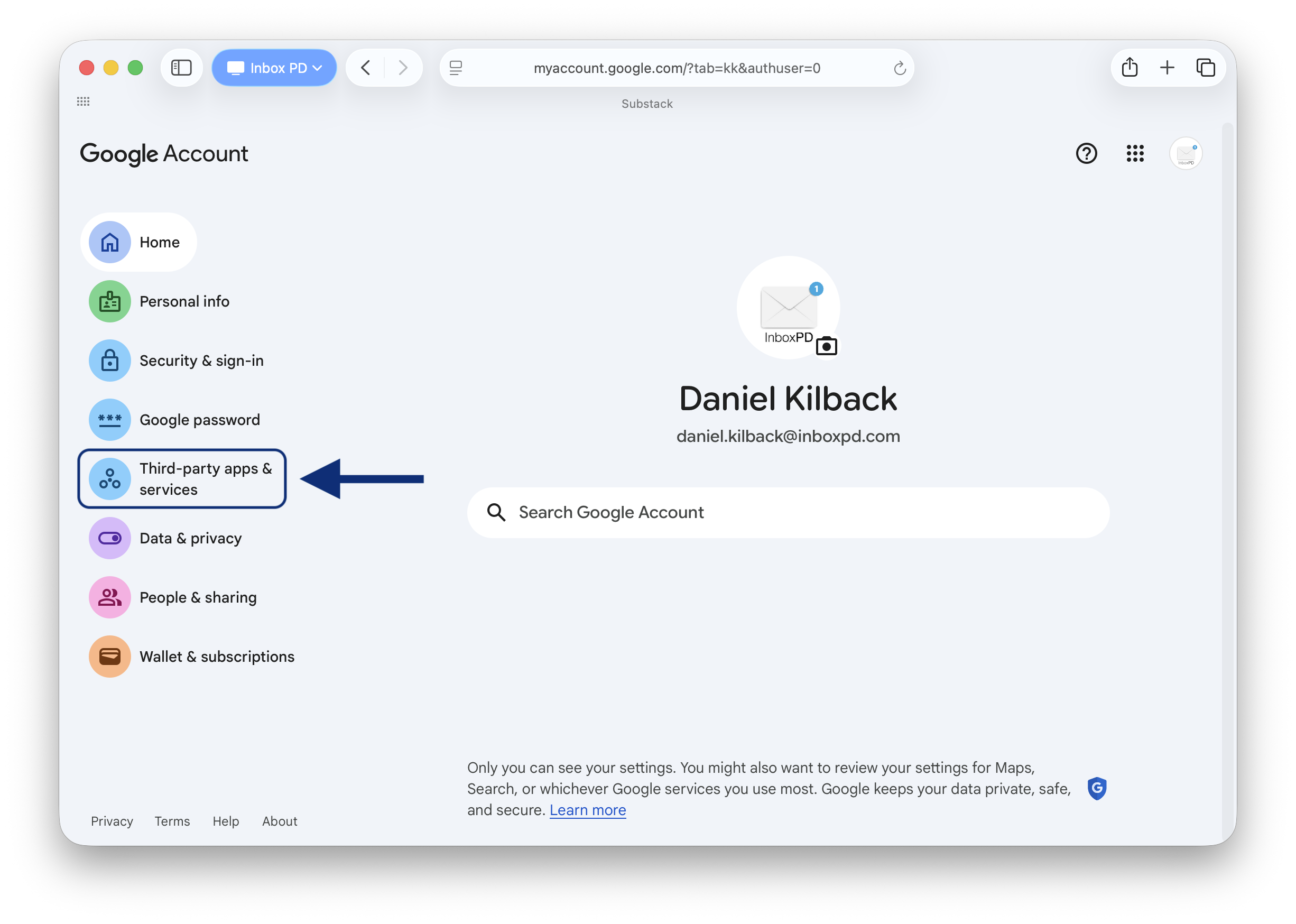
If you’re ready to do your audit now, go and do it. If you’d like to dive deeper into the ‘why,’ keep reading
The Why
The data play. Many free tools use your content to improve their models. It's in the terms – "Improving our services." What that means in practice is that some apps, under specific terms, use accessed content as part of their training datasets. Your emails and documents contribute to that process without your meaningful knowledge or control. A student welfare referral. A confidential HR thread. That content feeds a system you no longer think about. You can't un-send it.
The acquisition. The startup you trusted in 2019 was probably built by people who genuinely cared about their product. The company that bought them in 2024 might be a data broker. Their entire business model is collecting and selling user profiles. Legally. You are not their customer; you are their product. They take what your emails reveal about you – your habits, your professional role, your relationships, your concerns – and they package and sell this information to anyone who'll pay for a profile like yours. The privacy policy changed. You got an email about it but didn’t read it. The access transferred automatically. Same key, different hands.
The breach. And sometimes the key just gets stolen. Think of your Google password and your 2FA as a security guard at the front door. Effective. But OAuth tokens don't go through the front door. They're a permanent staff badge that opens the loading dock around the back. The dangerous part isn't just that the attacker gets in, it's that it's hard to know. A failed login attempt triggers immediate alerts. OAuth token abuse relies on advanced threat monitoring that most schools and small organisations simply don't have in place. The attacker reads your emails. Downloads your files. Maps your contacts. Changing your Google password does nothing. The only way to cancel the badge is to revoke the connection entirely.
And that access doesn't read selectively. To access what it needs, the app passes over everything in your inbox. Every subject line. Every sender. Every attachment name. In any workplace, that means HR conversations, board communications, and confidential planning documents. The app sees all of it equally.
The app may not be malicious. But it has access it was never meant to have. You can't undo past exposure. But revoking these connections today stops future exposure immediately. That five-minute audit puts you back in control of who has a key to your account.
Next week: another default setting that’s been sharing more than you realize.